
Mozilla Open Policy & Advocacy Blog: Mozilla Mornings: Choice or Illusion? Tackling Harmful Design Practices
The first edition of Mozilla Mornings in 2024 will explore the impact of harmful design on consumers in the digital world and the role regulation can play in addressing such practices.
In the evolving digital landscape, deceptive and manipulative design practices, as well as aggressive personalisation and profiling pose significant threats to consumer welfare, potentially leading to financial loss, privacy breaches, and compromised security.
While existing EU regulations address some aspects of these issues, questions persist about their adequacy in combating harmful design patterns comprehensively. What additional measures are needed to ensure digital fairness for consumers and empower designers who want to act ethically?
To discuss these issues, we are delighted to announce that the following speakers will be participating in our panel discussion:
- Egelyn Braun, Team Leader DG JUST, European Commission
- Estelle Hary, Co-founder, Design Friction
- Silvia de Conca, Amsterdam Law & Technology Institute, Vrije Universiteit Amsterdam
- Finn Myrstad, Digital Policy Director, Norwegian Consumer Council
The event will also feature a fireside chat with MEP Kim van Sparrentak from Greens/EFA.
- Date: Wednesday 20th March 2024
- Location: L42, Rue de la Loi 42, 1000 Brussels
- Time: 08:30 – 10:30 CET
To register, click here.
The post Mozilla Mornings: Choice or Illusion? Tackling Harmful Design Practices appeared first on Open Policy & Advocacy.
Niko Matsakis: Borrow checking without lifetimes
This blog post explores an alternative formulation of Rust’s type system that eschews lifetimes in favor of places. The TL;DR is that instead of having 'a represent a lifetime in the code, it can represent a set of loans, like shared(a.b.c) or mut(x). If this sounds familiar, it should, it’s the basis for polonius, but reformulated as a type system instead of a static analysis. This blog post is just going to give the high-level ideas. In follow-up posts I’ll dig into how we can use this to support interior references and other advanced borrowing patterns. In terms of implementation, I’ve mocked this up a bit, but I intend to start extending a-mir-formality to include this analysis.
Why would you want to replace lifetimes?Lifetimes are the best and worst part of Rust. The best in that they let you express very cool patterns, like returning a pointer into some data in the middle of your data structure. But they’ve got some serious issues. For one, the idea of what a lifetime is rather abstract, and hard for people to grasp (“what does 'a actually represent?”). But also Rust is not able to express some important patterns, most notably interior references, where one field of a struct refers to data owned by another field.
So what is a lifetime exactly?Here is the definition of a lifetime from the RFC on non-lexical lifetimes:
Whenever you create a borrow, the compiler assigns the resulting reference a lifetime. This lifetime corresponds to the span of the code where the reference may be used. The compiler will infer this lifetime to be the smallest lifetime that it can have that still encompasses all the uses of the reference.
Read the RFC for more details.
Replacing a lifetime with an originUnder this formulation, 'a no longer represents a lifetime but rather an origin – i.e., it explains where the reference may have come from. We define an origin as a set of loans. Each loan captures some place expression (e.g. a or a.b.c), that has been borrowed along with the mode in which it was borrowed (shared or mut).
Origin = { Loan } Loan = shared(Place) | mut(Place) Place = variable(.field)* // e.g., a.b.c Defining typesUsing origins, we can define Rust types roughly like this (obviously I’m ignoring a bunch of complexity here…):
Type = TypeName < Generic* > | & Origin Type | & Origin mut Type TypeName = u32 (for now I'll ignore the rest of the scalars) | () (unit type, don't worry about tuples) | StructName | EnumName | UnionName Generic = Type | OriginHere is the first interesting thing to note: there is no 'a notation here! This is because I’ve not introduced generics yet. Unlike Rust proper, this formulation of the type system has a concrete syntax (Origin) for what 'a represents.
Explicit types for a simple programHaving a fully explicit type system also means we can easily write out example programs where all types are fully specified. This used to be rather challenging because we had no notation for lifetimes. Let’s look at a simple example, a program that ought to get an error:
let mut counter: u32 = 22_u32; let p: & /*{shared(counter)}*/ u32 = &counter; // --------------------- // no syntax for this today! counter += 1; // Error: cannot mutate `counter` while `p` is live println!("{p}");Apart from the type of p, this is valid Rust. Of course, it won’t compile, because we can’t modify counter while there is a live shared reference p (playground). As we continue, you will see how the new type system formulation arrives at the same conclusion.
Basic typing judgmentsTyping judgments are the standard way to describe a type system. We’re going to phase in the typing judgments for our system iteratively. We’ll start with a simple, fairly standard formulation that doesn’t include borrow checking, and then show how we introduce borrow checking. For this first version, the typing judgment we are defining has the form
Env |- Expr : TypeThis says, “in the environment Env, the expression Expr is legal and has the type Type”. The environment Env here defines the local variables in scope. The Rust expressions we are looking at for our sample program are pretty simple:
Expr = integer literal (e.g., 22_u32) | & Place | Expr + Expr | Place (read the value of a place) | Place = Expr (overwrite the value of a place) | ...Since we only support one scalar type (u32), the typing judgment for Expr + Expr is as simple as:
Env |- Expr1 : u32 Env |- Expr2 : u32 ----------------------------------------- addition Env |- Expr1 + Expr2 : u32The rule for Place = Expr assignments is based on subtyping:
Env |- Expr : Type1 Env |- Place : Type2 Env |- Type1 <: Type2 ----------------------------------------- assignment Env |- Place = Expr : ()The rule for &Place is somewhat more interesting:
Env |- Place : Type ----------------------------------------- shared references Env |- & Place : & {shared(Place)} TypeThe rule just says that we figure out the type of the place Place being borrowed (here, the place is counter and its type will be u32) and then we have a resulting reference to that type. The origin of that reference will be {shared(Place)}, indicating that the reference came from Place:
&{shared(Place)} Type Computing livenessTo introduce borrow checking, we need to phase in the idea of liveness.1 If you’re not familiar with the concept, the NLL RFC has a nice introduction:
The term “liveness” derives from compiler analysis, but it’s fairly intuitive. We say that a variable is live if the current value that it holds may be used later.
Unlike with NLL, where we just computed live variables, we’re going to compute live places:
LivePlaces = { Place }To compute the set of live places, we’ll introduce a helper function LiveBefore(Env, LivePlaces, Expr): LivePlaces. LiveBefore() returns the set of places that are live before Expr is evaluated, given the environment Env and the set of places live after expression. I won’t define this function in detail, but it looks roughly like this:
// `&Place` reads `Place`, so add it to `LivePlaces` LiveBefore(Env, LivePlaces, &Place) = LivePlaces ∪ {Place} // `Place = Expr` overwrites `Place`, so remove it from `LivePlaces` LiveBefore(Env, LivePlaces, Place = Expr) = LiveBefore(Env, (LivePlaces - {Place}), Expr) // `Expr1` is evaluated first, then `Expr2`, so the set of places // live after expr1 is the set that are live *before* expr2 LiveBefore(Env, LivePlaces, Expr1 + Expr2) = LiveBefore(Env, LiveBefore(Env, LivePlaces, Expr2), Expr1) ... etc ... Integrating liveness into our typing judgmentsTo detect borrow check errors, we need to adjust our typing judgment to include liveness. The result will be as follows:
(Env, LivePlaces) |- Expr : TypeThis judgment says, “in the environment Env, and given that the function will access LivePlaces in the future, Expr is valid and has type Type”. Integrating liveness in this way gives us some idea of what accesses will happen in the future.
For compound expressions, like Expr1 + Expr2, we have to adjust the set of live places to reflect control flow:
LiveAfter1 = LiveBefore(Env, LiveAfter2, Expr2) (Env, LiveAfter1) |- Expr1 : u32 (Env, LiveAfter2) |- Expr2 : u32 ----------------------------------------- addition (Env, LiveAfter2) |- Expr1 + Expr2 : u32We start out with LiveAfter2, i.e., the places that are live after the entire expression. These are also the same as the places live after expression 2 is evaluated, since this expression doesn’t itself reference or overwrite any places. We then compute LiveAfter1 – i.e., the places live after Expr1 is evaluated – by looking at the places that are live before Expr2. This is a bit mind-bending and took me a bit of time to see. The tricky bit here is that liveness is computed backwards, but most of our typing rules (and intution) tends to flow forwards. If it helps, think of the “fully desugared” version of +:
let tmp0 = <Expr1> // <-- the set LiveAfter1 is live here (ignoring tmp0, tmp1) let tmp1 = <Expr2> // <-- the set LiveAfter2 is live here (ignoring tmp0, tmp1) tmp0 + tmp1 // <-- the set LiveAfter2 is live here Borrow checking with livenessNow that we know liveness information, we can use it to do borrow checking. We’ll introduce a “permits” judgment:
(Env, LiveAfter) permits Loanthat indicates that “taking the loan Loan would be allowed given the environment and the live places”. Here is the rule for assignments, modified to include liveness and the new “permits” judgment:
(Env, LiveAfter - {Place}) |- Expr : Type1 (Env, LiveAfter) |- Place : Type2 (Env, LiveAfter) |- Type1 <: Type2 (Env, LiveAfter) permits mut(Place) ----------------------------------------- assignment (Env, LiveAfter) |- Place = Expr : ()Before I dive into how we define “permits”, let’s go back to our example and get an intution for what is going on here. We want to declare an error on this assigment:
let mut counter: u32 = 22_u32; let p: &{shared(counter)} u32 = &counter; counter += 1; // <-- Error println!("{p}"); // <-- p is liveNote that, because of the println! on the next line, p will be in our LiveAfter set. Looking at the type of p, we see that it includes the loan shared(counter). The idea then is that mutating counter is illegal because there is a live loan shared(counter), which implies that counter must be immutable.
Restating that intution:
A set Live of live places permits a loan Loan1 if, for every live place Place in Live, the loans in the type of Place are compatible with Loan1.
Written more formally:
∀ Place ∈ Live { (Env, Live) |- Place : Type ∀ Loan2 ∈ Loans(Type) { Compatible(Loan1, Loan2) } } ----------------------------------------- (Env, Live) permits Loan1This definition makes use of two helper functions:
- Loans(Type) – the set of loans that appear in the type
- Compatible(Loan1, Loan2) – defines if two loans are compatible. Two shared loans are always compatible. A mutable loan is only compatible with another loan if the places are disjoint.
The goal of this post was to give a high-level intution. I wrote it from memory, so I’ve probably overlooked a thing or two. In follow-up posts though I want to go deeper into how the system I’ve been playing with works and what new things it can support. Some high-level examples:
- How to define subtyping, and in particular the role of liveness in subtyping
- Important borrow patterns that we use today and how they work in the new system
- Interior references that point at data owned by other struct fields and how it can be supported
-
If this is not obvious to you, don’t worry, it wasn’t obvious to me either. It turns out that using liveness in the rules is the key to making them simple. I’ll try to write a follow-up about the alternatives I explored and why they don’t work later on. ↩︎
Mozilla Thunderbird: Towards Thunderbird for Android – K-9 Mail 6.800 Simplifies Adding Email Accounts
We’re happy to announce the release of K-9 Mail 6.800. The main goal of this version is to make it easier for you to add your email accounts to the app.
With another item crossed off the list, this brings us one step closer towards Thunderbird for Android.
New account setupSetting up an email account in K-9 Mail is something many new users have struggled with in the past. That’s mainly because automatic setup was only supported for a handful of large email providers. If you had an email account with another email provider, you had to manually enter the incoming and outgoing server settings. But finding the correct server settings can be challenging.
So we set out to improve the setup experience. Since this part of the app was quite old and had a couple of other problems, we used this opportunity to rewrite the whole account setup component. This turned out to be more work than originally anticipated. But we’re quite happy with the result.
Let’s have a brief look at the steps involved in setting up a new account.
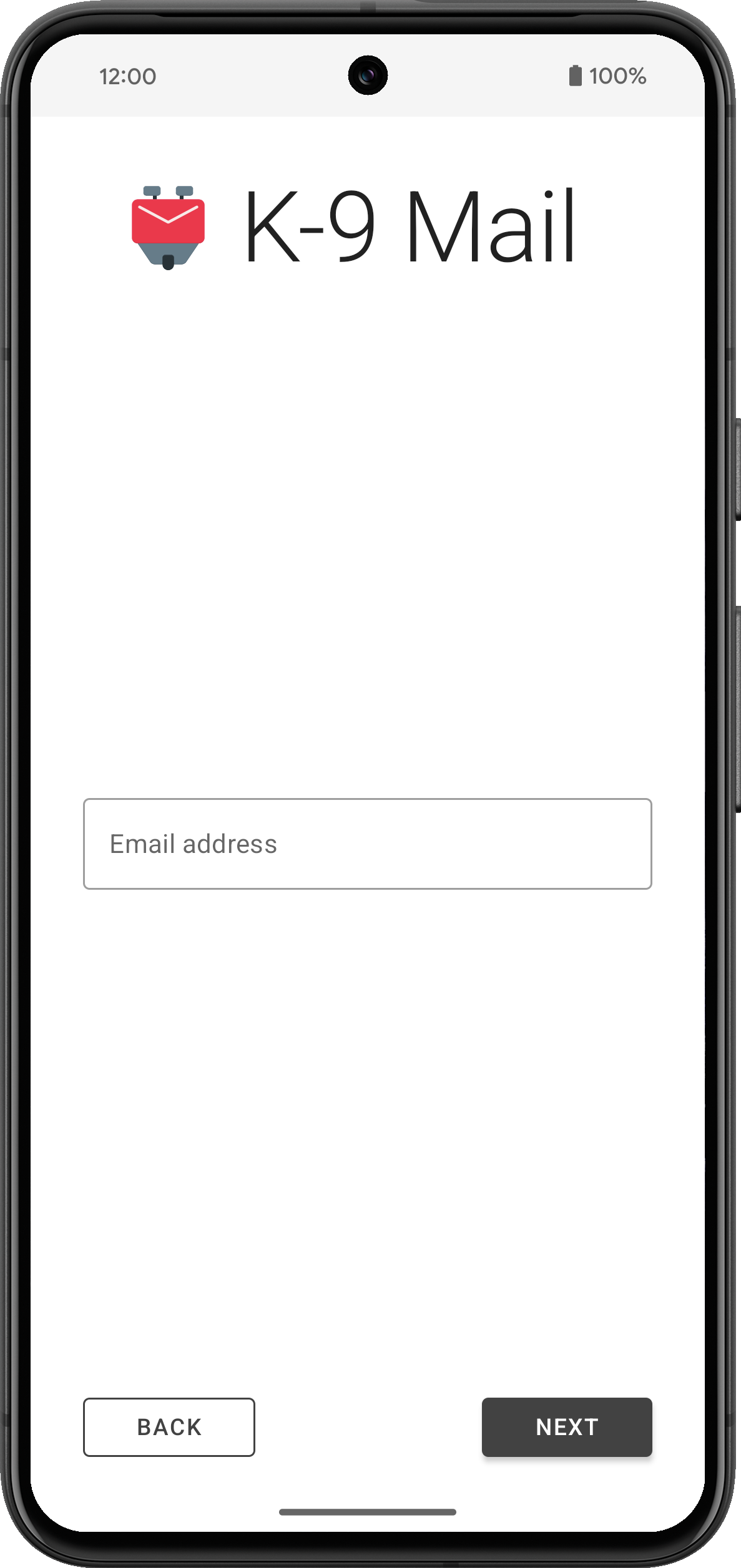
1. Enter email addressTo get the process started, all you have to do is enter the email address of the account you want to set up in K-9 Mail.
 2. Provide login credentials
After tapping the Next button, the app will use Thunderbird’s Autoconfig mechanism to try to find the appropriate incoming and outgoing server settings. Then you’ll be asked to provide a password or use the web login flow, depending on the email provider.
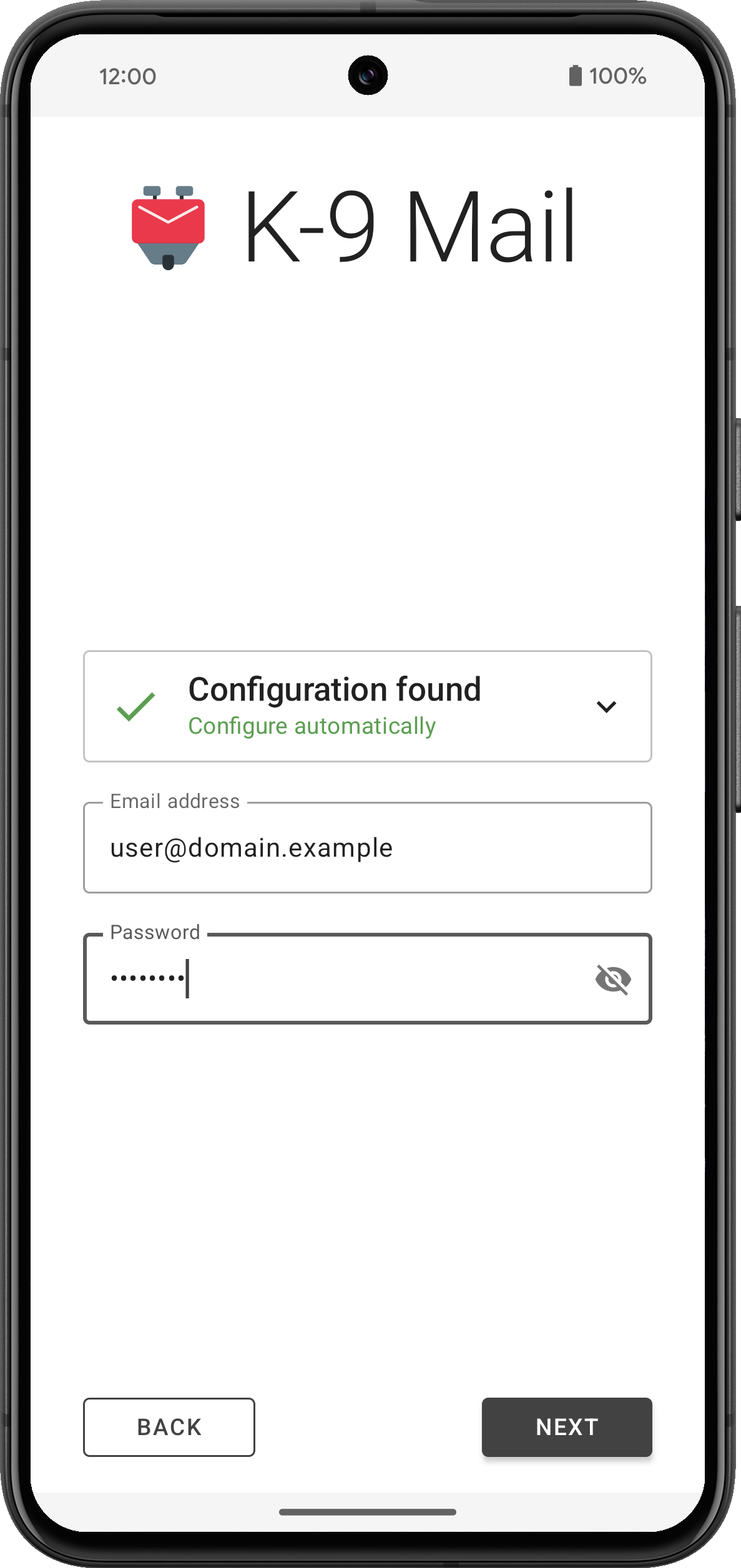

The app will then try to log in to the incoming and outgoing server using the provided credentials.
3. Provide some basic information about the accountIf your login credentials check out, you’ll be asked to provide your name for outgoing messages. For all the other inputs you can go with the defaults. All settings can be changed later, once an account has been set up.
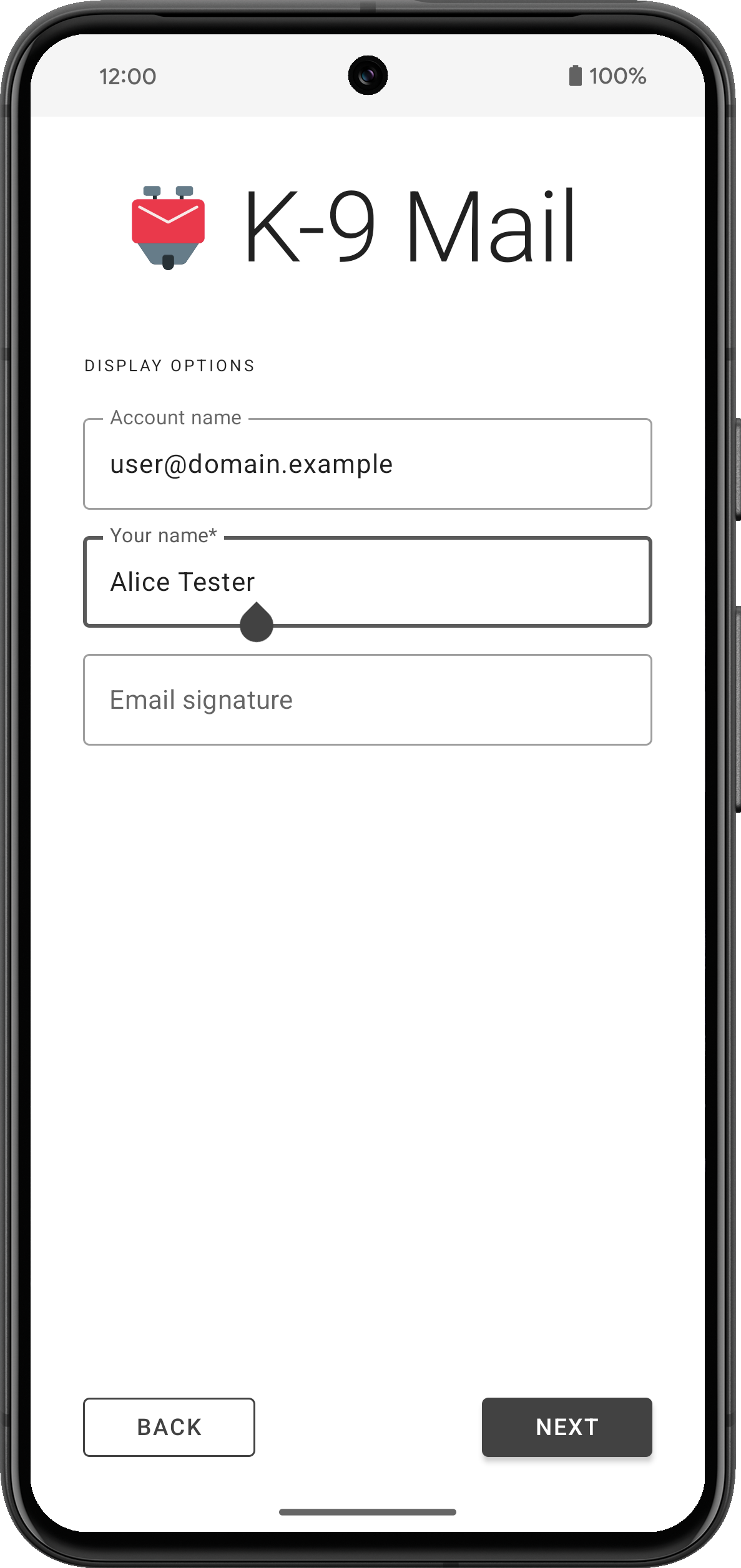
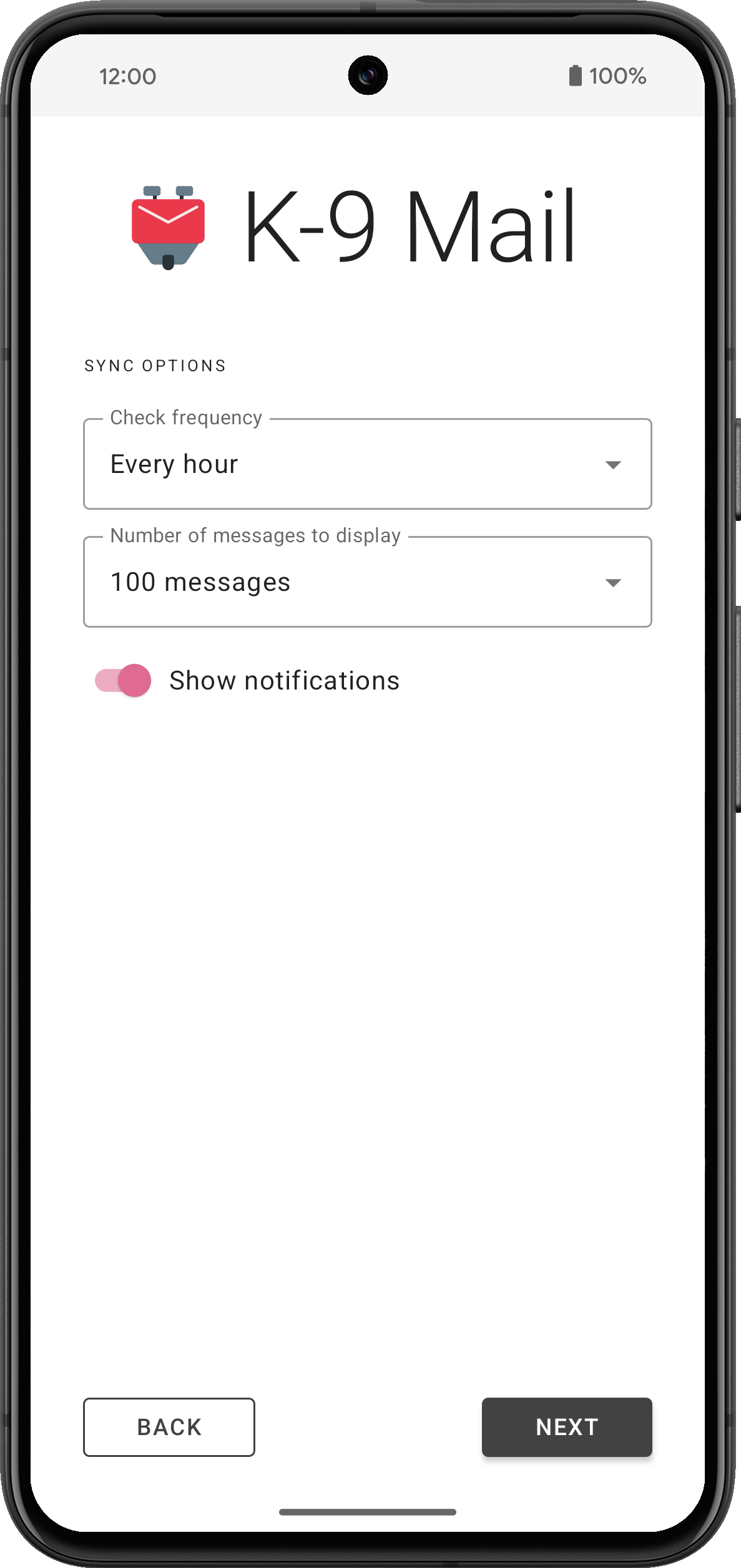
If everything goes well, that’s all it takes to set up an account.
Of course there’s still cases where the app won’t be able to automatically find a configuration and the user will be asked to manually provide the incoming and outgoing server settings. But we’ll be working with email providers to hopefully reduce the number of times this happens.
What else is new?While the account setup rewrite was our main development focus, we’ve also made a couple of smaller changes and bug fixes. You can find a list of the most notable ones below.
Improvements and behavior changes- Made it harder to accidentally trigger swipe actions in the message list screen
- IMAP: Added support for sending the ID command (that is required by some email providers)
- Improved screen reader experience in various places
- Improved display of some HTML messages
- Changed background color in message view and compose screens when using dark theme
- Adding to contacts should now allow you again to add the email address to an existing contact
- Added image handling within the context menu for hyperlinks
- A URI pasted when composing a message will now be surrounded by angle brackets
- Don’t use nickname as display name when auto-completing recipient using the nickname
- Changed compose icon in the message list widget to match the icon inside the app
- Don’t attempt to open file: URIs in an email; tapping such a link will now copy the URL to the clipboard instead
- Added option to return to the message list after marking a message as unread in the message view
- Combined settings “Return to list after delete” and “Show next message after delete” into “After deleting or moving a message”
- Moved “Show only subscribed folders” setting to “Folders” section
- Added copy action to recipient dropdown in compose screen (to work around missing drag & drop functionality)
- Simplified the app icon so it can be a vector drawable
- Added support for the IMAP MOVE extension
- Fixed bug where account name wasn’t displayed in the message view when it should
- Fixed bugs with importing and exporting identities
- The app will no longer ask to save a draft when no changes have been made to an existing draft message
- Fixed bug where “Cannot connect to crypto provider” was displayed when the problem wasn’t the crypto provider
- Fixed a crash caused by an interaction with OpenKeychain 6.0.0
- Fixed inconsistent behavior when replying to messages
- Fixed display issue with recipients in message view screen
- Fixed display issues when rendering a message/rfc822 inline part
- Fixed display issue when removing an account
- Fixed notification sounds on WearOS devices
- Fixed the app so it runs on devices that don’t support home screen widgets
- Removed Hebrew and Korean translations because of how incomplete they were; volunteer translators welcome!
- A fresh app install on Android 14 will be missing the “alarms & reminders” permission required for Push to work. Please allow setting alarms and reminders in Android’s app settings under Alarms & reminders.
- Some software keyboards automatically capitalize words when entering the email address in the first account setup screen.
- When a password containing line breaks is pasted during account setup, these line breaks are neither ignored nor flagged as an error. This will most likely lead to an authentication error when checking server settings.
Version 6.800 has started gradually rolling out. As always, you can get it on the following platforms:
GitHub | F-Droid | Play Store
(Note that the release will gradually roll out on the Google Play Store, and should appear shortly on F-Droid, so please be patient if it doesn’t automatically update.)
The post Towards Thunderbird for Android – K-9 Mail 6.800 Simplifies Adding Email Accounts appeared first on The Thunderbird Blog.
Mozilla Addons Blog: Developer Spotlight: YouTube Search Fixer
Like a lot of us during the pandemic lockdown, Shubham Bose found himself consuming more YouTube content than ever before. That’s when he started to notice all the unwanted oddities appearing in his YouTube search results — irrelevant suggested videos, shorts, playlists, etc. Shubham wanted a cleaner, more focused search experience, so he decided to do something about it. He built YouTube Search Fixer. The extension streamlines YouTube search results in a slew of customizable ways, like removing “For you,” “People also search for,” “Related to your search,” and so on. You can also remove entire types of content like shorts, live streams, auto-generated mixes, and more.
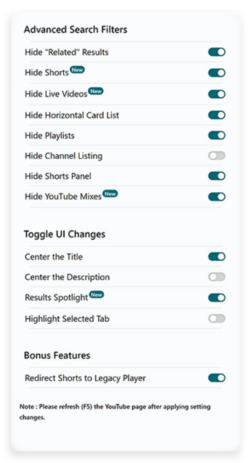
The extension makes it easy to customize YouTube to suit you.
Early versions of the extension were less customizable and removed most types of suggested search results by default, but over time Shubham learned that different users want different things in their search results. “I realized the line between ‘helpful’ and ‘distracting’ is very subjective,” explains Shubham. “What one person finds useful, another might not. Ultimately, it’s up to the user to decide what works best for them. That’s why I decided to give users granular control using an Options page. Now people can go about hiding elements they find distracting while keeping those they deem helpful. It’s all about striking that personal balance.”
Despite YouTube Search Fixer’s current wealth of customization options (a cool new feature automatically redirects Shorts to their normal length versions), Shubham plans to expand his extension’s feature set. He’s considering keyword highlighting and denylist options, which would give users extreme control over search filtering.
More than solving what he felt was a problem with YouTube’s default search results, Shubham was motivated to build his extension as a “way of giving back to a community I deeply appreciate… I’ve used Firefox since I was in high school. Like countless others, I’ve benefited greatly from the ever helpful MDN Web Docs and the incredible add-ons ecosystem Mozilla hosts and helps thrive. They offer nice developer tools and cultivate a helpful and welcoming community. So making this was my tiny way of giving back and saying ‘thank you’.”

When he’s not writing extensions that improve the world’s most popular video streaming site, Shubham enjoys photographing his home garden in Lucknow, India. “It isn’t just a hobby,” he explains. “Experimenting with light, composition and color has helped me focus on visual aesthetics (in software development). Now, I actively pay attention to little details when I create visually appealing and user-friendly interfaces.”
Do you have an intriguing extension development story? Do tell! Maybe your story should appear on this blog. Contact us at amo-featured [at] mozilla [dot] org and let us know a bit about your extension development journey.
The post Developer Spotlight: YouTube Search Fixer appeared first on Mozilla Add-ons Community Blog.
Mozilla Thunderbird: Thunderbird Monthly Development Digest: February 2024

Hello Thunderbird Community! I can’t believe it’s already the end of February. Time goes by very fast and it seems that there’s never enough time to do all the things that you set your mind to. Nonetheless, it’s that time of the month again for a juicy and hopefully interesting Thunderbird Development Digest.
If this is your first time reading our monthly Dev Digest, these are short posts to give our community visibility into features and updates being planned for Thunderbird, as well as progress reports on work that’s in the early stages of development.
Let’s jump right into it, because there’s a lot to get excited about!
Rust and ExchangeThings are moving steadily on this front. Maybe not as fast as we would like, but we’re handling a complicated implementation and we’re adding a new protocol for the first time in more than a decade, so some friction is to be expected.
Nonetheless, you can start following the progress in our Thundercell repository. We’re using this repo to temporarily “park” crates and other libraries we’re aiming to vendor inside Thunderbird.
We’re aiming at reaching an alpha state where we can land in Thunderbird later next month and start asking for user feedback on Daily.
Mozilla Account + Thunderbird Sync <figcaption class="wp-element-caption">Illustration by Alessandro Castellani</figcaption>
Things are moving forward on this front as well. We’re currently in the process of setting up our own SyncServer and TokenStorage in order to allow users to log in with their Mozilla Account but sync the Thunderbird data in an independent location from the Firefox data. This gives us an extra layer of security as it will prevent an app from accessing the other app’s data and vice versa.
In case you didn’t know, you can already use a Mozilla account and Sync on Daily, but this only works with a staging server and you’ll need an alternate Mozilla account for testing. There are a couple of known bugs but overall things seem to be working properly. Once we switch to our storage server, we will expose this feature more and enable it on Beta for everyone to test.
Oh, Snap!Our continuous efforts to own our packages and distribution methods is moving forward with the internal creation of a Snap package. (For background, last year we took ownership of the Thunderbird Flatpak.)
We’re currently internally testing the Beta and things seem to work accordingly. We will announce it publicly when it’s available from the Snap Store, with the objective of offering both Stable and Beta channels.
We’re exploring the possibility of also offering a Daily channel, but that’s a bit more complicated and we will need more time to make sure it’s doable and automated, so stay tuned.
As usual, if you want to see things as they land you can always check the pushlog and try running daily, which would be immensely helpful for catching bugs early.
See ya next month,
Alessandro Castellani (he, him)
Director of Product Engineering
If you’re interested in joining the technical discussion around Thunderbird development, consider joining one or several of our mailing list groups here.
The post Thunderbird Monthly Development Digest: February 2024 appeared first on The Thunderbird Blog.
The Rust Programming Language Blog: Clippy: Deprecating `feature = "cargo-clippy"`
Since Clippy v0.0.97 and before it was shipped with rustup, Clippy implicitly added a feature = "cargo-clippy" config1 when linting your code with cargo clippy.
Back in the day (2016) this was necessary to allow, warn or deny Clippy lints using attributes:
#[cfg_attr(feature = "cargo-clippy", allow(clippy_lint_name))]Doing this hasn't been necessary for a long time. Today, Clippy users will set lint levels with tool lint attributes using the clippy:: prefix:
#[allow(clippy::lint_name)]The implicit feature = "cargo-clippy" has only been kept for backwards compatibility, but will be deprecated in upcoming nightlies and later in 1.78.0.
AlternativeAs there is a rare use case for conditional compilation depending on Clippy, we will provide an alternative. So in the future (1.78.0) you will be able to use:
#[cfg(clippy)] TransitioningShould you only use stable toolchains, you can wait with the transition until Rust 1.78.0 (2024-05-02) is released.
Should you have instances of feature = "cargo-clippy" in your code base, you will see a warning from the new Clippy lint clippy::deprecated_clippy_cfg_attr available in the latest nightly Clippy. This lint can automatically fix your code. So if you should see this lint triggering, just run:
cargo clippy --fix -- -Aclippy::all -Wclippy::deprecated_clippy_cfg_attrThis will fix all instances in your code.
In addition, check your .cargo/config file for:
[target.'cfg(feature = "cargo-clippy")'] rustflags = ["-Aclippy::..."]If you have this config, you will have to update it yourself, by either changing it to cfg(clippy) or taking this opportunity to transition to setting lint levels in Cargo.toml directly.
Motivation for DeprecationCurrently, there's a call for testing, in order to stabilize checking conditional compilation at compile time, aka cargo check -Zcheck-cfg. If we were to keep the feature = "cargo-clippy" config, users would start seeing a lot of warnings on their feature = "cargo-clippy" conditions. To work around this, they would either need to allow the lint or have to add a dummy feature to their Cargo.toml in order to silence those warnings:
[features] cargo-clippy = []We didn't think this would be user friendly, and decided that instead we want to deprecate the implicit feature = "cargo-clippy" config and replace it with the clippy config.
-
It's likely that you didn't even know that Clippy implicitly sets this config (which was not a Cargo feature). This is intentional, as we stopped advertising and documenting this a long time ago. ↩
The Servo Blog: This month in Servo: gamepad support, font fallback, Space Jam, and more!
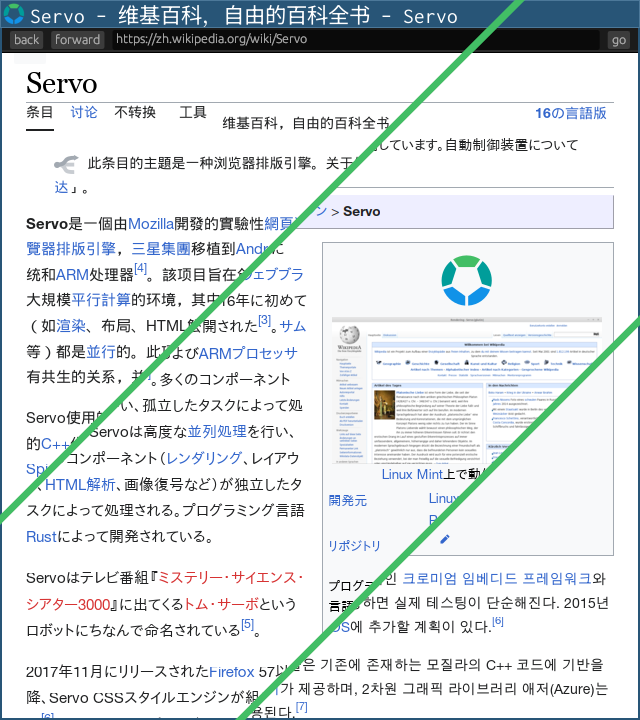 <figcaption>Font fallback now works for Chinese, Japanese, and Korean.</figcaption>
A couple of weeks ago, Servo surpassed its legacy layout engine in a core set of CSS2 test suites (84.2% vs 82.8% in legacy), but now we’ve surpassed legacy in the whole CSS test suite (63.6% vs 63.5%) as well! More on how we got there in a bit, but first let’s talk about new API support:
- as of 2024-02-07, you can safely console.log() symbols and large arrays (@syvb, #31241, #31267)
- as of 2024-02-07, we support CanvasRenderingContext2D.reset() (@syvb, #31258)
- as of 2024-02-08, we support navigator.hardwareConcurrency (@syvb, #31268)
- as of 2024-02-11, you can look up shorthands like ‘margin’ in getComputedStyle() (@sebsebmc, #31277)
- as of 2024-02-15, we accept SVG with the image/svg+xml mime type (@KiChjang, #31318)
- as of 2024-02-20, we support non-XR game controllers with the Gamepad API (@msub2, #31200)
- as of 2024-02-23, we have basic support for ‘text-transform’ (@mrobinson, @atbrakhi, #31396)
— except ‘full-width’, ‘full-size-kana’, grapheme clusters, and language-specific transforms
As of 2024-02-12, we have basic support for font fallback (@mrobinson, #31254)! This is especially important for pages that mix text from different languages. More work is needed to support shaping across element boundaries and shaping complex scripts like Arabic, but the current version should be enough for Chinese, Japanese, and Korean. If you encounter text that still fails to display, be sure to check your installed fonts against the page styles and Servo’s default font lists (Windows, macOS, Linux).
 <figcaption>
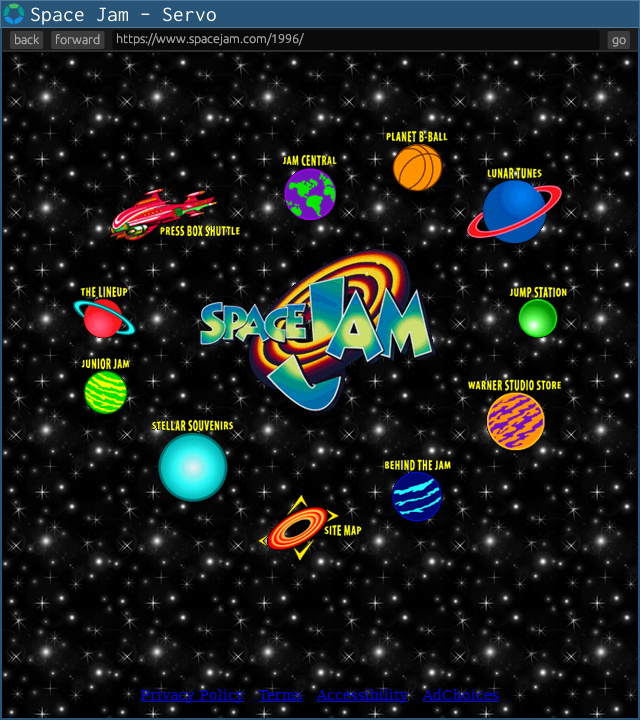
Space Jam (1996) now has correct layout with --pref layout.tables.enabled.
</figcaption>As of 2024-02-24, layout now runs in the script thread, rather than in a dedicated layout thread (@mrobinson, @jdm, #31346), though it can still spawn worker threads to parallelise layout work. Since the web platform almost always requires layout to run synchronously with script, this should allow us to make layout simpler and more reliable without regressing performance.
Our experimental tables support (--pref layout.tables.enabled) has vastly improved:
- as of 2024-01-26, we compute table column widths (@mrobinson, @Loiroriol, #31165)
- as of 2024-01-30, we support the <table cellpadding> attribute (@Loirooriol, #31201)
- as of 2024-02-11, we support ‘vertical-align’ in table cells (@mrobinson, @Loirooriol, #31246)
- as of 2024-02-14, we support ‘border-spacing’ on tables (@mrobinson, @Loirooriol, #31166, #31337)
- as of 2024-02-21, we support rows, columns, and row/column groups (@mrobinson, @Loirooriol, #31341)
Together with inline layout for <div align> and <center> (@Loirooriol, #31388) landing in 2024-02-24, we now render the classic Space Jam website correctly when tables are enabled!
As of 2024-02-24, we support videos with autoplay (@jdm, #31412), and windows containing videos no longer crash when closed (@jdm, #31413).
Many layout and CSS bugs have also been fixed:
- as of 2024-01-28, correct rounding of clientLeft, clientTop, clientWidth, and clientHeight (@mrobinson, #31187)
- as of 2024-01-30, correct cache invalidation of client{Left,Top,Width,Height} after reflow (@Loirooriol, #31210, #31219)
- as of 2024-02-03, correct width and height for preloaded Image objects (@syvb, #31253)
- as of 2024-02-07, correct [...spreading] and indexing[0] of style objects (@Loirooriol, #31299)
- as of 2024-02-09, correct border widths in fragmented inlines (@mrobinson, #31292)
- as of 2024-02-11, correct UA styles for <hr> (@sebsebmc, #31297)
- as of 2024-02-24, correct positioning of absolutes with ‘inset: auto’ (@mrobinson, #31418)
We’ve landed a few embedding improvements:
- we’ve removed several mandatory WindowMethods relating to OpenGL video playback (@mrobinson, #31209)
- we’ve removed webrender_surfman, and WebrenderSurfman is now in gfx as RenderingContext (@mrobinson, #31184)
We’ve finished migrating our DOM bindings to use typed arrays where possible (@Taym95, #31145, #31164, #31167, #31189, #31202, #31317, #31325), as part of an effort to reduce our unsafe code surface (#30889, #30862).
WebRender and Stylo are two major components of Servo that have been adopted by Firefox, making Servo’s versions of them a downstream fork. To make these forks easier to update, we’ve split WebRender and Stylo out of our main repo (@mrobinson, @delan, #31212, #31351, #31349, #31358, #31363, #31365, #31408, #31387, #31411, #31350).
We’ve fixed one of the blockers for building Servo with clang 16 (@mrobinson, #31306), but a blocker for clang 15 still remains. See #31059 for more details, including how to build Servo against clang 14.
We’ve also made some other dev changes:
- we’ve removed the unmaintained libsimpleservo C API (@mrobinson, #31172), though we’re open to adding a new C API someday
- we’ve upgraded surfman such that it no longer depends on winit (@mrobinson, #31224)
- we’ve added support for building Servo on Asahi Linux (@arrynfr, #31207)
- we’ve fixed problems building Servo on Debian (@mrobinson, @atbrakhi, #31281, #31276) and NixOS (@syvb, #31231)
- we’ve fixed failures when starting multiple CI try jobs at once (@mrobinson, #31347)
- we’ve made several improvements to mach try for starting CI try jobs (@sagudev, @mrobinson, #31141, #31290)
Rakhi Sharma will speak about Servo’s achievements at Open Source Summit North America on 16 April 2024 at 14:15 local time (21:15 UTC).
In the meantime, check out Rakhi’s recent talk Embedding Servo in Rust projects, which she gave at FOSDEM 2024 on 3 February 2024. Here you’ll learn about the state of the art around embedding Servo and Stylo, including a walkthrough of our example browser servoshell, our ongoing effort to integrate Servo with Tauri, and a sneak peek into how Stylo might someday be usable with Dioxus:
Embedding Servo in Rust projects by Rakhi Sharma at FOSDEM 2024
The Rust Programming Language Blog: Updated baseline standards for Windows targets
The minimum requirements for Tier 1 toolchains targeting Windows will increase with the 1.78 release (scheduled for May 02, 2024). Windows 10 will now be the minimum supported version for the *-pc-windows-* targets. These requirements apply both to the Rust toolchain itself and to binaries produced by Rust.
Two new targets have been added with Windows 7 as their baseline: x86_64-win7-windows-msvc and i686-win7-windows-msvc. They are starting as Tier 3 targets, meaning that the Rust codebase has support for them but we don't build or test them automatically. Once these targets reach Tier 2 status, they will be available to use via rustup.
Affected targets- x86_64-pc-windows-msvc
- i686-pc-windows-msvc
- x86_64-pc-windows-gnu
- i686-pc-windows-gnu
- x86_64-pc-windows-gnullvm
- i686-pc-windows-gnullvm
Prior to now, Rust had Tier 1 support for Windows 7, 8, and 8.1 but these targets no longer meet our requirements. In particular, these targets could no longer be tested in CI which is required by the Target Tier Policy and are not supported by their vendor.
The Talospace Project: Firefox 123 on POWER
Patrick Cloke: Joining the Matrix Spec Core Team
I was recently invited to join the Matrix “Spec Core Team”, the group who steward the Matrix protocol, from their own documentation:
The contents and direction of the Matrix Spec is governed by the Spec Core Team; a set of experts from across the whole Matrix community, representing all aspects of the Matrix ecosystem. The Spec Core Team acts as a subcommittee of the Foundation.This was the announced a couple of weeks ago and I’m just starting to get my feet wet! You can see an interview between myself, Tulir (another new member of the Spec Core Team), and Matthew (the Spec Core Team lead) in today’s This Week in Matrix. We cover a range of topics including Thunderbird (and Instantbird), some improvements I hope to make and more.
Patrick Cloke: Synapse URL Previews
Matrix includes the ability for a client to request that the server generate a “preview” for a URL. The client provides a URL to the server which returns Open Graph data as a JSON response. This leaks any URLs detected in the message content to the server, but protects the end user’s IP address, etc. from the URL being previewed. [1] (Note that clients generally disable URL previews for encrypted rooms, but it can be enabled.)
ImprovementsSynapse implements the URL preview endpoint, but it was a bit neglected. I was one of the few main developers running with URL previews enabled and sunk a bit of time into improving URL previews for my on sake. Some highlights of the improvements made include (in addition to lots and lots of refactoring):
- Support oEmbed for URL previews: #7920, #10714, #10759, #10814, #10819, #10822, #11065, #11669 (combine with HTML results), #14089, #14781.
- Reduction of 500 errors: #8883 (empty media), #9333 (unable to parse), #11061 (oEmbed errors).
- Improved support for document encodings: #9164, #9333, #11077, #11089.
- Support previewing XML documents (#11196) and data: URIs (#11767).
- Return partial information if images or oEmbed can’t be fetched: #12950, #15092.
- Skipping empty Open Graph (og) or meta tags: #12951.
- Support previewing from Twitter card information: #13056.
- Fallback to favicon if no images found: #12951.
- Ignore navgiation tags: #12951.
- Document how Synapse generates URL previews: #10753, #13261.
I also helped review many changes by others:
- Improved support for encodings: #10410.
- Safer content-type support: #11936.
- Attempts to fix Twitter previews: #11985.
- Remove useless elements from previews: #12887.
- Avoid crashes due to unbounded recursion: GHSA-22p3-qrh9-cx32.
And also fixed some security issues:
- Apply url_preview_url_blacklist to oEmbed and pre-cached images: #15601.
Overall, there was an improved result (from my point of view). A summary of some of the improvements. I tested 26 URLs (based on ones that had previously been reported or found to give issues). See the table below for testing at a few versions. The error reason was also broken out into whether JavaScript was required or some other error occurred. [2]
Version Release date Successful preview JavaScript required error Found image & description? 1.0.0 2019-06-11 15 4 14 1.12.0 2020-03-23 18 4 17 1.24.0 2020-12-09 20 1 16 1.36.0 2021-06-15 20 1 16 1.48.0 2021-11-30 20 1 11 1.60.0 2022-05-31 21 0 21 1.72.0 2022-11-22 22 0 21 1.84.0 2023-05-23 22 0 21 Future improvementsI am no longer working on Synapse, but some of the ideas I had for additional improvements included:
- Use BeautifulSoup instead of a custom parser to handle some edge cases in HTML documents better (WIP @ clokep/bs4).
- Always request both oEmbed and HTML (WIP @ clokep/oembed-and-html).
- Structured data support (JSON-LD, Microdata, RDFa) (#11540).
- Some minimal JavaScript support (#14118).
- Fixing any of the other issues with particular URLs (see this GitHub search).
- Thumbnailing of SVG images (which sites tend to use for favicons) (#1309).
There’s also a ton more that could be done here if you wanted, e.g. handling more data types (text and PDF are the ones I have frequently come across that would be helpful to preview). I’m sure there are also many other URLs that don’t work right now for some reason. Hopefully the URL preview code continues to improve!
[1]See some ancient documentation on the tradeoffs and design of URL previews. MSC4095 was recently written to bundle the URL preview information into evens. [2]This was done by instantiating different Synapse versions via Docker and asking them to preview URLs. (See the code.) This is not a super realistic test since it assumes that URLs are static over time. In particular some sites (e.g. Twitter) like to change what they allow you to access without being authenticated.The Rust Programming Language Blog: Rust participates in Google Summer of Code 2024
We're writing this blog post to announce that the Rust Project will be participating in Google Summer of Code (GSoC) 2024. If you're not eligible or interested in participating in GSoC, then most of this post likely isn't relevant to you; if you are, this should contain some useful information and links.
Google Summer of Code (GSoC) is an annual global program organized by Google that aims to bring new contributors to the world of open-source. The program pairs organizations (such as the Rust Project) with contributors (usually students), with the goal of helping the participants make meaningful open-source contributions under the guidance of experienced mentors.
As of today, the organizations that have been accepted into the program have been announced by Google. The GSoC applicants now have several weeks to send project proposals to organizations that appeal to them. If their project proposal is accepted, they will embark on a 12-week journey during which they will try to complete their proposed project under the guidance of an assigned mentor.
We have prepared a list of project ideas that can serve as inspiration for potential GSoC contributors that would like to send a project proposal to the Rust organization. However, applicants can also come up with their own project ideas. You can discuss project ideas or try to find mentors in the #gsoc Zulip stream. We have also prepared a proposal guide that should help you with preparing your project proposals.
You can start discussing the project ideas with Rust Project maintainers immediately. The project proposal application period starts on March 18, 2024, and ends on April 2, 2024 at 18:00 UTC. Take note of that deadline, as there will be no extensions!
If you are interested in contributing to the Rust Project, we encourage you to check out our project idea list and send us a GSoC project proposal! Of course, you are also free to discuss these projects and/or try to move them forward even if you do not intend to (or cannot) participate in GSoC. We welcome all contributors to Rust, as there is always enough work to do.
This is the first time that the Rust Project is participating in GSoC, so we are quite excited about it. We hope that participants in the program can improve their skills, but also would love for this to bring new contributors to the Project and increase the awareness of Rust in general. We will publish another blog post later this year with more information about our participation in the program.
Mozilla Performance Blog: Web Performance @ FOSDEM 2024
FOSDEM (Free and Open Source Software Developers’ European Meeting) is one of the largest gatherings of open-source enthusiasts, developers, and advocates worldwide. Each year there are many focused developer rooms (devrooms), managed by volunteers, and this year’s edition on 3-4 February saw the return of the Web Performance devroom managed by Peter Hedenskog from Wikimedia and myself (Dave Hunt) from Mozilla. Thanks to so many great talk proposals (we easily could have filled a full day), we were able to assemble a fantastic schedule, and at times the room was full, with as many people standing outside hoping to get in!
Dive into the talksThanks to the FOSDEM organisers and preparation from our speakers, we successfully managed to squeeze nine talks into the morning with a tight turnaround time. Here’s a rundown of the sessions:
1. The importance of Web Performance to Information EquityBas Schouten kicked off the morning with his informative talk on the vital role web performance plays on ensuring equal access to information and services for those with slower devices.
2. Let’s build a RUM system with open source toolsNext up we had Tsvetan Stoychev share what he’s learned working on Basic RUM – an open source real user monitoring system.
3. Better than loading fast… is loading instantly!At this point the room was at capacity, with at least as many people waiting outside! Next, Barry Pollard gave shared details on how to score near-perfect Core Web Vitals in his talk on pre-fetching and pre-rendering.
4. Keyboard InteractionsPatricija Cerkaite followed with her talk on how she helped to improve measuring keyboard interactions, and how this influenced Interaction to Next Paint, leading to a better experience for Input Method Editors (IME).
5. Web Performance at Mozilla and WikimediaMidway through the morning, Peter Hedenskog & myself shared some insights into how Wikimedia and Mozilla measure performance in our talk. Peter shared a some public dashboards, and I ran through a recent example of a performance regression affecting our page load tests.
6. Understanding how the web browser works, or tracing your way out of (performance) problemsWe handed the spotlight over to Alexander Timin for his talk on event tracing and browser engineering based on his experience working on the Chromium project.
7. Fast JavaScript with Data-Oriented DesignThe morning continued to go from strength to strength, with Markus Stange demonstrating in his talk how to iterate and optimise a small example project and showing how easy it is to use the Firefox Profiler.
8. From Google AdSense to FOSS: Lightning-fast privacy-friendly bannersAs we got closer to lunch, Tim Vereecke teased us with hamburger banner ads in his talk on replacing Google AdSense with open source alternative Revive Adserver to address privacy and performance concerns.
9. Insights from the RUM ArchiveFor our final session of the morning, Robin Marx introduced us to the RUM Archive, shared some insights and challenges with the data, and discussed the part real user monitoring plays alongside other performance analysis.
Beyond the devroomIt was great to see that the topic of web performance wasn’t limited to our devroom, with talks such as Debugging HTTP/3 upload speed in Firefox in the Mozilla devroom, Web Performance: Leveraging Qwik to Meet Google’s Core Web Vitals in the JavaScript devroom, and Firefox power profiling: a powerful visualization of web sustainability in the main track.
AcknowledgementsI would like to thank all the amazing FOSDEM volunteers for supporting the event. Thank you to our wonderful speakers and everyone who submitted a proposal for providing us with such an excellent schedule. Thank you to Peter Hedenskog for bringing his devroom management experience to the organisation and facilitation of the devroom. Thank you to Andrej Glavic, Julien Wajsberg, and Nazım Can Altınova for their help managing the room and ensuring everything ran smoothly. See you next year!
Firefox Developer Experience: Firefox WebDriver Newsletter — 123
WebDriver is a remote control interface that enables introspection and control of user agents. As such it can help developers to verify that their websites are working and performing well with all major browsers. The protocol is standardized by the W3C and consists of two separate specifications: WebDriver classic (HTTP) and the new WebDriver BiDi (Bi-Directional).
This newsletter gives an overview of the work we’ve done as part of the Firefox 123 release cycle.
ContributionsWith Firefox being an open source project, we are grateful to get contributions from people outside of Mozilla.
WebDriver code is written in JavaScript, Python, and Rust so any web developer can contribute! Read how to setup the work environment and check the list of mentored issues for Marionette.
WebDriver BiDi New: Support for the “browsingContext.locateNodes” commandSupport for the browsingContext.locateNodes command has been introduced to find elements on the given page. Supported locators for now are CssLocator and XPathLocator. Additional support for locating elements by InnerTextLocator will be added in a later version.
This command encapsulates the logic for locating elements within a web page’s DOM, streamlining the process for users familiar with the Find Element(s) methods from WebDriver classic (HTTP). Alternatively, users can still utilize script.evaluate, although it necessitates knowledge of the appropriate JavaScript code for evaluation.
New: Support for the “network.fetchError” eventAdded support for the network.fetchError event that is emitted when a network request ends in an error.
Update for the “browsingContext.create” commandThe browsingContext.create command has been improved on Android to seamlessly switch to opening a new tab if the type argument is specified as window.
We implemented this change to simplify the creation of tests that need to run across various desktop platforms and Android. Consequently, specific adjustments for new top-level browsing contexts are no longer required, enhancing the test creation process.
Bug Fixes- An issue with the deserialization process of a DateRemoteValue was fixed, where the presence of a non-standard (ISO 8601) date string such as 200009 did not trigger an error.
- An issue with the script.evaluate, script.callFunction, and script.disown commands was fixed where specifying both the context and realm arguments would result in an invalid argument error, rather than simply ignoring the realm argument as intended.
- An issue with Element Send Keys was fixed where sending text containing surrogate pairs would fail.
The Rust Programming Language Blog: 2023 Annual Rust Survey Results
Hello, Rustaceans!
The Rust Survey Team is excited to share the results of our 2023 survey on the Rust Programming language, conducted between December 18, 2023 and January 15, 2024. As in previous years, the 2023 State of Rust Survey was focused on gathering insights and feedback from Rust users, and all those who are interested in the future of Rust more generally.
This eighth edition of the survey surfaced new insights and learning opportunities straight from the global Rust language community, which we will summarize below. In addition to this blog post, this year we have also prepared a report containing charts with aggregated results of all questions in the survey. Based on feedback from recent years, we have also tried to provide more comprehensive and interactive charts in this summary blog post. Let us know what you think!
Our sincerest thanks to every community member who took the time to express their opinions and experiences with Rust over the past year. Your participation will help us make Rust better for everyone.
There's a lot of data to go through, so strap in and enjoy!
Participation Survey Started Completed Completion rate Views 2022 11 482 9 433 81.3% 25 581 2023 11 950 9 710 82.2% 16 028As shown above, in 2023, we have received 37% fewer survey views in vs 2022, but saw a slight uptick in starts and completions. There are many reasons why this could have been the case, but it’s possible that because we released the 2022 analysis blog so late last year, the survey was fresh in many Rustaceans’ minds. This might have prompted fewer people to feel the need to open the most recent survey. Therefore, we find it doubly impressive that there were more starts and completions in 2023, despite the lower overall view count.
CommunityThis year, we have relied on automated translations of the survey, and we have asked volunteers to review them. We thank the hardworking volunteers who reviewed these automated survey translations, ultimately allowing us to offer the survey in seven languages: English, Simplified Chinese, French, German, Japanese, Russian, and Spanish. We decided not to publish the survey in languages without a translation review volunteer, meaning we could not issue the survey in Portuguese, Ukrainian, Traditional Chinese, or Korean.
The Rust Survey team understands that there were some issues with several of these translated versions, and we apologize for any difficulty this has caused. We are always looking for ways to improve going forward and are in the process of discussing improvements to this part of the survey creation process for next year.
We saw a 3pp increase in respondents taking this year’s survey in English – 80% in 2023 and 77% in 2022. Across all other languages, we saw only minor variations – all of which are likely due to us offering fewer languages overall this year due to having fewer volunteers.
Rust user respondents were asked which country they live in. The top 10 countries represented were, in order: United States (22%), Germany (12%), China (6%), United Kingdom (6%), France (6%), Canada (3%), Russia (3%), Netherlands (3%), Japan (3%), and Poland (3%) . We were interested to see a small reduction in participants taking the survey in the United States in 2023 (down 3pp from the 2022 edition) which is a positive indication of the growing global nature of our community! You can try to find your country in the chart below:
<noscript> <img alt="where-do-you-live" height="600" src="https://blog.rust-lang.org/images/2024-02-rust-survey-2023/where-do-you-live.png" /> </noscript> [PNG] [SVG]Once again, the majority of our respondents reported being most comfortable communicating on technical topics in English at 92.7% — a slight difference from 93% in 2022. Again, Chinese was the second-highest choice for preferred language for technical communication at 6.1% (7% in 2022).
<noscript> <img alt="what-are-your-preferred-languages-for-technical-communication" height="400" src="https://blog.rust-lang.org/images/2024-02-rust-survey-2023/what-are-your-preferred-languages-for-technical-communication.png" /> </noscript> [PNG] [SVG]We also asked whether respondents consider themselves members of a marginalized community. Out of those who answered, 76% selected no, 14% selected yes, and 10% preferred not to say.
We have asked the group that selected “yes” which specific groups they identified as being a member of. The majority of those who consider themselves a member of an underrepresented or marginalized group in technology identify as lesbian, gay, bisexual, or otherwise non-heterosexual. The second most selected option was neurodivergent at 41% followed by trans at 31.4%. Going forward, it will be important for us to track these figures over time to learn how our community changes and to identify the gaps we need to fill.
<noscript> <img alt="which-marginalized-group" height="500" src="https://blog.rust-lang.org/images/2024-02-rust-survey-2023/which-marginalized-group.png" /> </noscript> [PNG] [SVG]As Rust continues to grow, we must acknowledge the diversity, equity, and inclusivity (DEI)-related gaps that exist in the Rust community. Sadly, Rust is not unique in this regard. For instance, only 20% of 2023 respondents to this representation question consider themselves a member of a racial or ethnic minority and only 26% identify as a woman. We would like to see more equitable figures in these and other categories. In 2023, the Rust Foundation formed a diversity, equity, and inclusion subcommittee on its Board of Directors whose members are aware of these results and are actively discussing ways that the Foundation might be able to better support underrepresented groups in Rust and help make our ecosystem more globally inclusive. One of the central goals of the Rust Foundation board's subcommittee is to analyze information about our community to find out what gaps exist, so this information is a helpful place to start. This topic deserves much more depth than is possible here, but readers can expect more on the subject in the future.
Rust usageIn 2023, we saw a slight jump in the number of respondents that self-identify as a Rust user, from 91% in 2022 to 93% in 2023.
<noscript> <img alt="do-you-use-rust" height="300" src="https://blog.rust-lang.org/images/2024-02-rust-survey-2023/do-you-use-rust.png" /> </noscript> [PNG] [SVG]Of those who used Rust in 2023, 49% did so on a daily (or nearly daily) basis — a small increase of 2pp from the previous year.
<noscript> <img alt="how-often-do-you-use-rust" height="300" src="https://blog.rust-lang.org/images/2024-02-rust-survey-2023/how-often-do-you-use-rust.png" /> </noscript> [PNG] [SVG]31% of those who did not identify as Rust users cited the perception of difficulty as the primary reason for not having used it, with 67% reporting that they simply haven’t had the chance to prioritize learning Rust yet, which was once again the most common reason.
<noscript> <img alt="why-dont-you-use-rust" height="500" src="https://blog.rust-lang.org/images/2024-02-rust-survey-2023/why-dont-you-use-rust.png" /> </noscript> [PNG] [SVG] [Wordcloud of open answers]Of the former Rust users who participated in the 2023 survey, 46% cited factors outside their control (a decrease of 1pp from 2022), 31% stopped using Rust due to preferring another language (an increase of 9pp from 2022), and 24% cited difficulty as the primary reason for giving up (a decrease of 6pp from 2022).
<noscript> <img alt="why-did-you-stop-using-rust" height="500" src="https://blog.rust-lang.org/images/2024-02-rust-survey-2023/why-did-you-stop-using-rust.png" /> </noscript> [PNG] [SVG] [Wordcloud of open answers]Rust expertise has generally increased amongst our respondents over the past year! 23% can write (only) simple programs in Rust (a decrease of 6pp from 2022), 28% can write production-ready code (an increase of 1pp), and 47% consider themselves productive using Rust — up from 42% in 2022. While the survey is just one tool to measure the changes in Rust expertise overall, these numbers are heartening as they represent knowledge growth for many Rustaceans returning to the survey year over year.
<noscript> <img alt="how-would-you-rate-your-rust-expertise" height="500" src="https://blog.rust-lang.org/images/2024-02-rust-survey-2023/how-would-you-rate-your-rust-expertise.png" /> </noscript> [PNG] [SVG]In terms of operating systems used by Rustaceans, the situation is very similar to the results from 2022, with Linux being the most popular choice of Rust users, followed by macOS and Windows, which have a very similar share of usage.
<noscript> <img alt="which-os-do-you-use" height="400" src="https://blog.rust-lang.org/images/2024-02-rust-survey-2023/which-os-do-you-use.png" /> </noscript> [PNG] [SVG] [Wordcloud of open answers]Rust programmers target a diverse set of platforms with their Rust programs, even though the most popular target by far is still a Linux machine. We can see a slight uptick in users targeting WebAssembly, embedded and mobile platforms, which speaks to the versatility of Rust.
<noscript> <img alt="which-os-do-you-target" height="500" src="https://blog.rust-lang.org/images/2024-02-rust-survey-2023/which-os-do-you-target.png" /> </noscript> [PNG] [SVG] [Wordcloud of open answers]We cannot of course forget the favourite topic of many programmers: which IDE (developer environment) do they use. Visual Studio Code still seems to be the most popular option, with RustRover (which was released last year) also gaining some traction.
<noscript> <img alt="what-ide-do-you-use" height="500" src="https://blog.rust-lang.org/images/2024-02-rust-survey-2023/what-ide-do-you-use.png" /> </noscript> [PNG] [SVG] [Wordcloud of open answers]You can also take a look at the linked wordcloud that summarizes open answers to this question (the "Other" category), to see what other editors are also popular.
Rust at Work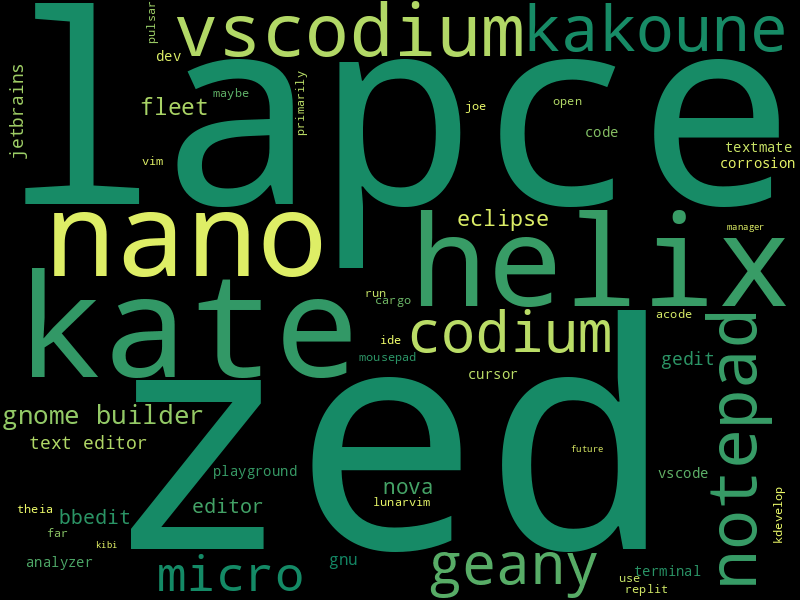
We were excited to see a continued upward year-over-year trend of Rust usage at work. 34% of 2023 survey respondents use Rust in the majority of their coding at work — an increase of 5pp from 2022. Of this group, 39% work for organizations that make non-trivial use of Rust.
<noscript> <img alt="do-you-personally-use-rust-at-work" height="500" src="https://blog.rust-lang.org/images/2024-02-rust-survey-2023/do-you-personally-use-rust-at-work.png" /> </noscript> [PNG] [SVG]Once again, the top reason employers of our survey respondents invested in Rust was the ability to build relatively correct and bug-free software at 86% — a 4pp increase from 2022 responses. The second most popular reason was Rust’s performance characteristics at 83%.
<noscript> <img alt="why-you-use-rust-at-work" height="500" src="https://blog.rust-lang.org/images/2024-02-rust-survey-2023/why-you-use-rust-at-work.png" /> </noscript> [PNG] [SVG]We were also pleased to see an increase in the number of people who reported that Rust helped their company achieve its goals at 79% — an increase of 7pp from 2022. 77% of respondents reported that their organization is likely to use Rust again in the future — an increase of 3pp from the previous year. Interestingly, we saw a decrease in the number of people who reported that using Rust has been challenging for their organization to use: 34% in 2023 and 39% in 2022. We also saw an increase of respondents reporting that Rust has been worth the cost of adoption: 64% in 2023 and 60% in 2022.
<noscript> <img alt="which-statements-apply-to-rust-at-work" height="500" src="https://blog.rust-lang.org/images/2024-02-rust-survey-2023/which-statements-apply-to-rust-at-work.png" /> </noscript> [PNG] [SVG]There are many factors playing into this, but the growing awareness around Rust has likely resulted in the proliferation of resources, allowing new teams using Rust to be better supported.
In terms of technology domains, it seems that Rust is especially popular for creating server backends, web and networking services and cloud technologies.
<noscript> <img alt="technology-domain" height="600" src="https://blog.rust-lang.org/images/2024-02-rust-survey-2023/technology-domain.png" /> </noscript> [PNG] [SVG] [Wordcloud of open answers]You can scroll the chart to the right to see more domains. Note that the Database implementation and Computer Games domains were not offered as closed answers in the 2022 survey (they were merely submitted as open answers), which explains the large jump.
It is exciting to see the continued growth of professional Rust usage and the confidence so many users feel in its performance, control, security and safety, enjoyability, and more!
ChallengesAs always, one of the main goals of the State of Rust survey is to shed light on challenges, concerns, and priorities on Rustaceans’ minds over the past year.
Of those respondents who shared their main worries for the future of Rust (9,374), the majority were concerned about Rust becoming too complex at 43% — a 5pp increase from 2022. 42% of respondents were concerned about a low level of Rust usage in the tech industry. 32% of respondents in 2023 were most concerned about Rust developers and maintainers not being properly supported — a 6pp increase from 2022.
We saw a notable decrease in respondents who were not at all concerned about the future of Rust, 18% in 2023 and 30% in 2022.
Thank you to all participants for your candid feedback which will go a long way toward improving Rust for everyone.
<noscript> <img alt="what-are-your-biggest-worries-about-rust" height="500" src="https://blog.rust-lang.org/images/2024-02-rust-survey-2023/what-are-your-biggest-worries-about-rust.png" /> </noscript> [PNG] [SVG] [Wordcloud of open answers]Closed answers marked with N/A were not present in the previous (2022) version of the survey.
In terms of features that Rust users want to be implemented, stabilized or improved, the most desired improvements are in the areas of traits (trait aliases, associated type defaults, etc.), const execution (generic const expressions, const trait methods, etc.) and async (async closures, coroutines).
<noscript> <img alt="which-features-do-you-want-stabilized" height="600" src="https://blog.rust-lang.org/images/2024-02-rust-survey-2023/which-features-do-you-want-stabilized.png" /> </noscript> [PNG] [SVG] [Wordcloud of open answers]It is interesting that 20% of respondents answered that they wish Rust to slow down the development of new features, which likely goes hand in hand with the previously mentioned worry that Rust becomes too complex.
The areas of Rust that Rustaceans seem to struggle with the most seem to be asynchronous Rust, the traits and generics system and also the borrow checker.
<noscript> <img alt="which-problems-do-you-remember-encountering" height="400" src="https://blog.rust-lang.org/images/2024-02-rust-survey-2023/which-problems-do-you-remember-encountering.png" /> </noscript> [PNG] [SVG] [Wordcloud of open answers]Respondents of the survey want the Rust maintainers to mainly prioritize fixing compiler bugs (68%), improving the runtime performance of Rust programs (57%) and also improving compile times (45%).
<noscript> <img alt="how-should-work-be-prioritized" height="800" src="https://blog.rust-lang.org/images/2024-02-rust-survey-2023/how-should-work-be-prioritized.png" /> </noscript> [PNG] [SVG]Same as in recent years, respondents noted that compilation time is one of the most important areas that should be improved. However, it is interesting to note that respondents also seem to consider runtime performance to be more important than compile times.
Looking aheadEach year, the results of the State of Rust survey help reveal the areas that need improvement in many areas across the Rust Project and ecosystem, as well as the aspects that are working well for our community.
We are aware that the survey has contained some confusing questions, and we will try to improve upon that in the next year's survey. If you have any suggestions for the Rust Annual survey, please let us know!
We are immensely grateful to those who participated in the 2023 State of Rust Survey and facilitated its creation. While there are always challenges associated with developing and maintaining a programming language, this year we were pleased to see a high level of survey participation and candid feedback that will truly help us make Rust work better for everyone.
If you’d like to dig into more details, we recommend you to browse through the full survey report.
Don Marti: what if Twitter is Road Runner?
Remember the famous 9 Rules For Drawing Road Runner Cartoons, by Chuck Jones, that made the rounds a while ago?
It seems like there is a very similar set of rules for Twitter.
- Twitter users cannot harm Twitter management, can only tweet
- The only forces that can harm Twitter management are the failures of its own schemes
- Twitter management could stop at any time, but chooses not to
- No new dialogue (all the Twitter business model ideas were already tweeted some time during SXSW 2006)
- Twitter users cannot leave Twitter
Apple’s App Store is Riddled With Popular Piracy Brands (Update)
Death of a Chatbot, body blow to an industry
European digital rights groups say the future of online privacy is on a knife edge
The high cost of Uber’s small profit
Pluralistic: How a billionaire’s mediocre pump-and-dump “book” became a “bestseller” (15 Feb 2024)
The original WWW proposal is a Word for Macintosh 4.0 file from 1990, can we open it?
Six months in, journalist-owned tech publication 404 Media is profitable
The Ukraine war is ultimately about Poland
Broader opens: on the relevance of cryptolaw for open lawyers
America Tires Of Big Telecom’s Shit, Driving Boom In Community-Owned Broadband Networks
Ending the Churn: To Solve the Recruiting Crisis, the Army Should Be Asking Very Different Questions
Don Marti: moderation is harder than editing
Moderation is the hardest part of running any Internet service. Running a database at very large scale is not something that anyone can do, but people who can do it are around and available to hire. And you don’t have to write your own BigTable or Cassandra or whatever, like today’s Big Tech had to do—you can just call ScyllaDB or even click the right thing on Amazon AWS.
Moderation is harder than editing, and I say that as a former editor.
Editors know the language and audience in advance. Moderators might get a bunch of new users from nobody knows where, writing in a language they don’t know.
Editors know the schedule and quantity of content to be posted in advance. Moderators have to deal with content and complaints as they come in.
If an editor doesn’t understand something, they can just tell the writer that it won’t be clear to the reader, and make the writer rewrite or explain it. A moderator just has to figure it out.
An editor has more options: delay, ask for a rewrite, and yes, even edit. A moderator has fewer available actions.
Meta’s content moderator subcontractor model faces legal squeeze in Spain
It sure looks like X (Twitter) has a Verified bot problem
Substack says it will not remove or demonetize Nazi content
Bonus linksOriginal WWW proposal is a Word for Macintosh 4 file from 1990, can we open it?
This Guy Has Built an Open Source Search Engine as an Alternative to Google in His Spare Time
CGI programs have an attractive one step deployment model
A 2024 Plea for Lean Software (with running code)
Anne van Kesteren: WebKit and web-platform-tests
Let me state upfront that this strategy of keeping WebKit synchronized with parts of web-platform-tests has worked quite well for me, but I’m not at all an expert in this area so you might want to take advice from someone else.
Once I've identified what tests will be impacted by my changes to WebKit, including what additional coverage might be needed, I create a branch in my local web-platform-tests checkout to make the necessary changes to increase coverage. I try to be a little careful here so it'll result in a nice pull request against web-platform-tests later. I’ve been a web-platform-tests contributor quite a while longer than I’ve been a WebKit contributor so perhaps it’s not surprising that my approach to test development starts with web-platform-tests.
I then run import-w3c-tests web-platform-tests/[testsDir] -s [wptParentDir] --clean-dest-dir on the WebKit side to ensure it has the latest tests, including any changes I made. And then I usually run them and revise, as needed.
This has worked surprisingly well for a number of changes I made to date and hasn’t let me down. Two things to be mindful of:
- On macOS, don’t put development work, especially WebKit, inside ~/Documents. You might not have a good time.
- [wptParentDir] above needs to contain a directory named web-platform-tests, not wpt. This is annoyingly different from the default you get when cloning web-platform-tests (the repository was renamed to wpt at some point). Perhaps something to address in import-w3c-tests.
Ludovic Hirlimann: My geeking plans for this summer
During July I’ll be visiting family in Mongolia but I’ve also a few things that are very geeky that I want to do.
The first thing I want to do is plug the Ripe Atlas probes I have. It’s litle devices that look like that :
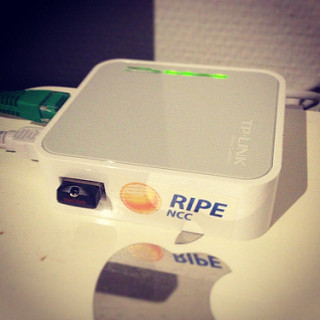
They enable anybody with a ripe atlas or ripe account to make measurements for dns queries and others. This helps making a global better internet. I have three of these probes I’d like to install. It’s good because last time I checked Mongolia didn’t have any active probe. These probes will also help Internet become better in Mongolia. I’ll need to buy some network cables before leaving because finding these in mongolia is going to be challenging. More on atlas at https://atlas.ripe.net/.
The second thing I intend to do is map Mongolia a bit better on two projects the first is related to Mozilla and maps gps coordinateswith wifi access point. Only a little part of The capital Ulaanbaatar is covered as per https://location.services.mozilla.com/map#11/47.8740/106.9485 I want this to be way more because having an open data source for this is important in the future. As mapping is my new thing I’ll probably edit Openstreetmap in order to make the urban parts of mongolia that I’ll visit way more usable on all the services that use OSM as a source of truth. There is already a project to map the capital city at http://hotosm.org/projects/mongolia_mapping_ulaanbaatar but I believe osm can server more than just 50% of mongolia’s population.
I got inspired to write this post by mu son this morning, look what he is doing at 17 months :

Andrew Sutherland: Talk Script: Firefox OS Email Performance Strategies
Last week I gave a talk at the Philly Tech Week 2015 Dev Day organized by the delightful people at technical.ly on some of the tricks/strategies we use in the Firefox OS Gaia Email app. Note that the credit for implementing most of these techniques goes to the owner of the Email app’s front-end, James Burke. Also, a special shout-out to Vivien for the initial DOM Worker patches for the email app.
I tried to avoid having slides that both I would be reading aloud as the audience read silently, so instead of slides to share, I have the talk script. Well, I also have the slides here, but there’s not much to them. The headings below are the content of the slides, except for the one time I inline some code. Note that the live presentation must have differed slightly, because I’m sure I’m much more witty and clever in person than this script would make it seem…
Cover Slide: Who!
Hi, my name is Andrew Sutherland. I work at Mozilla on the Firefox OS Email Application. I’m here to share some strategies we used to make our HTML5 app Seem faster and sometimes actually Be faster.
What’s A Firefox OS (Screenshot Slide)
But first: What is a Firefox OS? It’s a multiprocess Firefox gecko engine on an android linux kernel where all the apps including the system UI are implemented using HTML5, CSS, and JavaScript. All the apps use some combination of standard web APIs and APIs that we hope to standardize in some form.


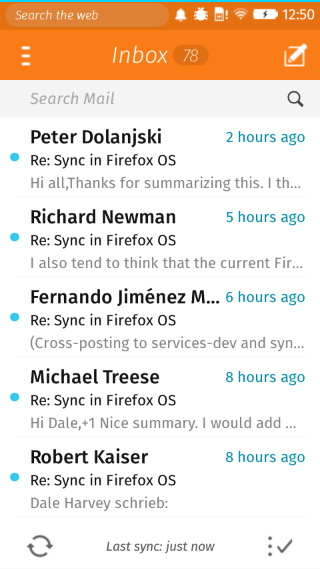
Here are some screenshots. We’ve got the default home screen app, the clock app, and of course, the email app.
It’s an entirely client-side offline email application, supporting IMAP4, POP3, and ActiveSync. The goal, like all Firefox OS apps shipped with the phone, is to give native apps on other platforms a run for their money.
And that begins with starting up fast.
Fast Startup: The Problems
But that’s frequently easier said than done. Slow-loading websites are still very much a thing.
The good news for the email application is that a slow network isn’t one of its problems. It’s pre-loaded on the phone. And even if it wasn’t, because of the security implications of the TCP Web API and the difficulty of explaining this risk to users in a way they won’t just click through, any TCP-using app needs to be a cryptographically signed zip file approved by a marketplace. So we do load directly from flash.
However, it’s not like flash on cellphones is equivalent to an infinitely fast, zero-latency network connection. And even if it was, in a naive app you’d still try and load all of your HTML, CSS, and JavaScript at the same time because the HTML file would reference them all. And that adds up.
It adds up in the form of event loop activity and competition with other threads and processes. With the exception of Promises which get their own micro-task queue fast-lane, the web execution model is the same as all other UI event loops; events get scheduled and then executed in the same order they are scheduled. Loading data from an asynchronous API like IndexedDB means that your read result gets in line behind everything else that’s scheduled. And in the case of the bulk of shipped Firefox OS devices, we only have a single processor core so the thread and process contention do come into play.
So we try not to be a naive.
Seeming Fast at Startup: The HTML Cache
If we’re going to optimize startup, it’s good to start with what the user sees. Once an account exists for the email app, at startup we display the default account’s inbox folder.
What is the least amount of work that we can do to show that? Cache a screenshot of the Inbox. The problem with that, of course, is that a static screenshot is indistinguishable from an unresponsive application.
So we did the next best thing, (which is) we cache the actual HTML we display. At startup we load a minimal HTML file, our concatenated CSS, and just enough Javascript to figure out if we should use the HTML cache and then actually use it if appropriate. It’s not always appropriate, like if our application is being triggered to display a compose UI or from a new mail notification that wants to show a specific message or a different folder. But this is a decision we can make synchronously so it doesn’t slow us down.
Local Storage: Okay in small doses
We implement this by storing the HTML in localStorage.
Important Disclaimer! LocalStorage is a bad API. It’s a bad API because it’s synchronous. You can read any value stored in it at any time, without waiting for a callback. Which means if the data is not in memory the browser needs to block its event loop or spin a nested event loop until the data has been read from disk. Browsers avoid this now by trying to preload the Entire contents of local storage for your origin into memory as soon as they know your page is being loaded. And then they keep that information, ALL of it, in memory until your page is gone.
So if you store a megabyte of data in local storage, that’s a megabyte of data that needs to be loaded in its entirety before you can use any of it, and that hangs around in scarce phone memory.
To really make the point: do not use local storage, at least not directly. Use a library like localForage that will use IndexedDB when available, and then fails over to WebSQLDatabase and local storage in that order.
Now, having sufficiently warned you of the terrible evils of local storage, I can say with a sorta-clear conscience… there are upsides in this very specific case.
The synchronous nature of the API means that once we get our turn in the event loop we can act immediately. There’s no waiting around for an IndexedDB read result to gets its turn on the event loop.
This matters because although the concept of loading is simple from a User Experience perspective, there’s no standard to back it up right now. Firefox OS’s UX desires are very straightforward. When you tap on an app, we zoom it in. Until the app is loaded we display the app’s icon in the center of the screen. Unfortunately the standards are still assuming that the content is right there in the HTML. This works well for document-based web pages or server-powered web apps where the contents of the page are baked in. They work less well for client-only web apps where the content lives in a database and has to be dynamically retrieved.
The two events that exist are:
“DOMContentLoaded” fires when the document has been fully parsed and all scripts not tagged as “async” have run. If there were stylesheets referenced prior to the script tags, the script tags will wait for the stylesheet loads.
“load” fires when the document has been fully loaded; stylesheets, images, everything.
But none of these have anything to do with the content in the page saying it’s actually done. This matters because these standards also say nothing about IndexedDB reads or the like. We tried to create a standards consensus around this, but it’s not there yet. So Firefox OS just uses the “load” event to decide an app or page has finished loading and it can stop showing your app icon. This largely avoids the dreaded “flash of unstyled content” problem, but it also means that your webpage or app needs to deal with this period of time by displaying a loading UI or just accepting a potentially awkward transient UI state.
(Trivial HTML slide)
<link rel=”stylesheet” ...> <script ...></script> DOMContentLoaded!This is the important summary of our index.html.
We reference our stylesheet first. It includes all of our styles. We never dynamically load stylesheets because that compels a style recalculation for all nodes and potentially a reflow. We would have to have an awful lot of style declarations before considering that.
Then we have our single script file. Because the stylesheet precedes the script, our script will not execute until the stylesheet has been loaded. Then our script runs and we synchronously insert our HTML from local storage. Then DOMContentLoaded can fire. At this point the layout engine has enough information to perform a style recalculation and determine what CSS-referenced image resources need to be loaded for buttons and icons, then those load, and then we’re good to be displayed as the “load” event can fire.
After that, we’re displaying an interactive-ish HTML document. You can scroll, you can press on buttons and the :active state will apply. So things seem real.
Being Fast: Lazy Loading and Optimized Layers
But now we need to try and get some logic in place as quickly as possible that will actually cash the checks that real-looking HTML UI is writing. And the key to that is only loading what you need when you need it, and trying to get it to load as quickly as possible.
There are many module loading and build optimizing tools out there, and most frameworks have a preferred or required way of handling this. We used the RequireJS family of Asynchronous Module Definition loaders, specifically the alameda loader and the r-dot-js optimizer.
One of the niceties of the loader plugin model is that we are able to express resource dependencies as well as code dependencies.
RequireJS Loader Plugins
var fooModule = require('./foo'); var htmlString = require('text!./foo.html'); var localizedDomNode = require('tmpl!./foo.html');The standard Common JS loader semantics used by node.js and io.js are the first one you see here. Load the module, return its exports.
But RequireJS loader plugins also allow us to do things like the second line where the exclamation point indicates that the load should occur using a loader plugin, which is itself a module that conforms to the loader plugin contract. In this case it’s saying load the file foo.html as raw text and return it as a string.
But, wait, there’s more! loader plugins can do more than that. The third example uses a loader that loads the HTML file using the ‘text’ plugin under the hood, creates an HTML document fragment, and pre-localizes it using our localization library. And this works un-optimized in a browser, no compilation step needed, but it can also be optimized.
So when our optimizer runs, it bundles up the core modules we use, plus, the modules for our “message list” card that displays the inbox. And the message list card loads its HTML snippets using the template loader plugin. The r-dot-js optimizer then locates these dependencies and the loader plugins also have optimizer logic that results in the HTML strings being inlined in the resulting optimized file. So there’s just one single javascript file to load with no extra HTML file dependencies or other loads.
We then also run the optimizer against our other important cards like the “compose” card and the “message reader” card. We don’t do this for all cards because it can be hard to carve up the module dependency graph for optimization without starting to run into cases of overlap where many optimized files redundantly include files loaded by other optimized files.
Plus, we have another trick up our sleeve:
Seeming Fast: Preloading
Preloading. Our cards optionally know the other cards they can load. So once we display a card, we can kick off a preload of the cards that might potentially be displayed. For example, the message list card can trigger the compose card and the message reader card, so we can trigger a preload of both of those.
But we don’t go overboard with preloading in the frontend because we still haven’t actually loaded the back-end that actually does all the emaily email stuff. The back-end is also chopped up into optimized layers along account type lines and online/offline needs, but the main optimized JS file still weighs in at something like 17 thousand lines of code with newlines retained.
So once our UI logic is loaded, it’s time to kick-off loading the back-end. And in order to avoid impacting the responsiveness of the UI both while it loads and when we’re doing steady-state processing, we run it in a DOM Worker.
Being Responsive: Workers and SharedWorkers
DOM Workers are background JS threads that lack access to the page’s DOM, communicating with their owning page via message passing with postMessage. Normal workers are owned by a single page. SharedWorkers can be accessed via multiple pages from the same document origin.
By doing this, we stay out of the way of the main thread. This is getting less important as browser engines support Asynchronous Panning & Zooming or “APZ” with hardware-accelerated composition, tile-based rendering, and all that good stuff. (Some might even call it magic.)
When Firefox OS started, we didn’t have APZ, so any main-thread logic had the serious potential to result in janky scrolling and the impossibility of rendering at 60 frames per second. It’s a lot easier to get 60 frames-per-second now, but even asynchronous pan and zoom potentially has to wait on dispatching an event to the main thread to figure out if the user’s tap is going to be consumed by app logic and preventDefault called on it. APZ does this because it needs to know whether it should start scrolling or not.
And speaking of 60 frames-per-second…
Being Fast: Virtual List Widgets
…the heart of a mail application is the message list. The expected UX is to be able to fling your way through the entire list of what the email app knows about and see the messages there, just like you would on a native app.
This is admittedly one of the areas where native apps have it easier. There are usually list widgets that explicitly have a contract that says they request data on an as-needed basis. They potentially even include data bindings so you can just point them at a data-store.
But HTML doesn’t yet have a concept of instantiate-on-demand for the DOM, although it’s being discussed by Firefox layout engine developers. For app purposes, the DOM is a scene graph. An extremely capable scene graph that can handle huge documents, but there are footguns and it’s arguably better to err on the side of fewer DOM nodes.
So what the email app does is we create a scroll-region div and explicitly size it based on the number of messages in the mail folder we’re displaying. We create and render enough message summary nodes to cover the current screen, 3 screens worth of messages in the direction we’re scrolling, and then we also retain up to 3 screens worth in the direction we scrolled from. We also pre-fetch 2 more screens worth of messages from the database. These constants were arrived at experimentally on prototype devices.
We listen to “scroll” events and issue database requests and move DOM nodes around and update them as the user scrolls. For any potentially jarring or expensive transitions such as coordinate space changes from new messages being added above the current scroll position, we wait for scrolling to stop.
Nodes are absolutely positioned within the scroll area using their ‘top’ style but translation transforms also work. We remove nodes from the DOM, then update their position and their state before re-appending them. We do this because the browser APZ logic tries to be clever and figure out how to create an efficient series of layers so that it can pre-paint as much of the DOM as possible in graphic buffers, AKA layers, that can be efficiently composited by the GPU. Its goal is that when the user is scrolling, or something is being animated, that it can just move the layers around the screen or adjust their opacity or other transforms without having to ask the layout engine to re-render portions of the DOM.
When our message elements are added to the DOM with an already-initialized absolute position, the APZ logic lumps them together as something it can paint in a single layer along with the other elements in the scrolling region. But if we start moving them around while they’re still in the DOM, the layerization logic decides that they might want to independently move around more in the future and so each message item ends up in its own layer. This slows things down. But by removing them and re-adding them it sees them as new with static positions and decides that it can lump them all together in a single layer. Really, we could just create new DOM nodes, but we produce slightly less garbage this way and in the event there’s a bug, it’s nicer to mess up with 30 DOM nodes displayed incorrectly rather than 3 million.
But as neat as the layerization stuff is to know about on its own, I really mention it to underscore 2 suggestions:
1, Use a library when possible. Getting on and staying on APZ fast-paths is not trivial, especially across browser engines. So it’s a very good idea to use a library rather than rolling your own.
2, Use developer tools. APZ is tricky to reason about and even the developers who write the Async pan & zoom logic can be surprised by what happens in complex real-world situations. And there ARE developer tools available that help you avoid needing to reason about this. Firefox OS has easy on-device developer tools that can help diagnose what’s going on or at least help tell you whether you’re making things faster or slower:
– it’s got a frames-per-second overlay; you do need to scroll like mad to get the system to want to render 60 frames-per-second, but it makes it clear what the net result is
– it has paint flashing that overlays random colors every time it paints the DOM into a layer. If the screen is flashing like a discotheque or has a lot of smeared rainbows, you know something’s wrong because the APZ logic is not able to to just reuse its layers.
– devtools can enable drawing cool colored borders around the layers APZ has created so you can see if layerization is doing something crazy
There’s also fancier and more complicated tools in Firefox and other browsers like Google Chrome to let you see what got painted, what the layer tree looks like, et cetera.
And that’s my spiel.
Links
The source code to Gaia can be found at https://github.com/mozilla-b2g/gaia
The email app in particular can be found at https://github.com/mozilla-b2g/gaia/tree/master/apps/email
(I also asked for questions here.)